Wednesday, December 17, 2014

XNA and Kinect 2 hand motion demo

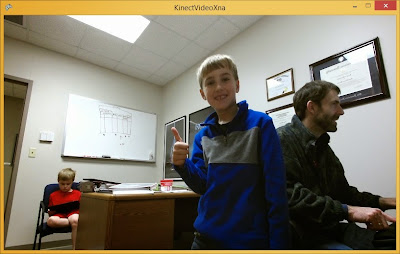
This demo will show you how to write a simple XNA application that reads hand motion from the Kinect v2. The Kinect sensor can detect motion for your entire body, but here I'll focus on just detecting hand motion and whether the hand is open (all fingers out) or closed (in a fist) as shown in the screenshot below.


Prerequisites

You must have the Kinect for Windows 2 correctly installed along with the SDK. There are plenty of online tutorials showing you how to program with the older Kinect; this is for the latest version.

See the Prerequisites section from my previous post on installing the necessary software to code this demo using Visual Studio 2013.


Create an XNA Project

First create an XNA project by selecting FileProject... from the menu. Then select XNA Game Studio 4.0 template under Visual C# and select Windows Game (2.0). Name the project KinectMotionDemo.


Add Kinect Reference

Right-click the project in the Solution Explorer and from the context menu select AddReference.... Type kinect in the dialog box's search box, and check the Microsoft.Kinect reference. Then press OK. You should now see Microsoft.Kinect among the project's References in the Solution Explorer.


Initialization

Add the Kinect namespace to your Game1.cs file:

using Microsoft.Kinect;

Inside the KinectMotionDemo namespace and immediately after the Game1 class, create a class that represents a Hand. We will keep track of whether the hand is left or right, open or closed, and its location to be displayed on the screen.

class Hand
{         
 // HandLeft or HandRight
 public JointType Type { get; set; }
 
 // Open or closed
 public HandState HandState { get; set; }

 // Screen location of hand
 public Vector2 ScreenPosition { get; set; }
}


Add some class-level variables which will be needed elsewhere:

// Active Kinect sensor
private KinectSensor kinectSensor;

// Body frame reader
private BodyFrameReader bodyFrameReader;

// Array for the bodies and hands
private Body[] bodies;
private Hand[] leftHands;
private Hand[] rightHands;

// Sprites used to display hands
private Texture2D leftHandOpenSprite;
private Texture2D leftHandClosedSprite;
private Texture2D rightHandOpenSprite;
private Texture2D rightHandClosedSprite;
Note that a Microsoft.Kinect.Body represents a person's body, and Kinect can track up to six people at the same time.

Add some code in the Initialize method to initialize the sensor, create arrays large enough to track up to six people, and add an event listener so we'll know when body sensor data is available.

protected override void Initialize()
{
 // Allow mouse to be visible when on top of the window
 IsMouseVisible = true;

 // One sensor is currently supported
 kinectSensor = KinectSensor.GetDefault();                                 

 // Determine how many bodies and hands can be tracked
 int totalBodies = kinectSensor.BodyFrameSource.BodyCount;
 bodies = new Body[totalBodies];
 leftHands = new Hand[totalBodies];
 rightHands = new Hand[totalBodies];

 // Open the reader for the body frames
 bodyFrameReader = kinectSensor.BodyFrameSource.OpenReader();

 // Specify handler for frame arrival
 bodyFrameReader.FrameArrived += this.Reader_BodyFrameArrived;
      
 // Open the sensor
 kinectSensor.Open();

 base.Initialize();
}


Override the Game class's OnExiting method to free up Kinect sensor when the game window is being closed.

protected override void OnExiting(object sender, EventArgs args)
{
 if (bodyFrameReader != null)
 {
  bodyFrameReader.Dispose();
  bodyFrameReader = null;
 }

 if (kinectSensor != null)
 {
  kinectSensor.Close();
  kinectSensor = null;
 }

 base.OnExiting(sender, args);
}

Where are the hands?

Now write the event listener for the body frame reader that will obtain the sensor data for the left and right hands of all the bodies that are being tracked. This method will call UpdateHandInfo, a method that will determine if the hand is open or closed and determine where it is located in depth space so it can be accurately mapped to an (x,y) location on the screen.

private void Reader_BodyFrameArrived(object sender, 
    BodyFrameArrivedEventArgs e)
{
 bool dataReceived = false;

 // Load captured body data into the array of bodies
 using (BodyFrame bodyFrame = e.FrameReference.AcquireFrame())
 {
  if (bodyFrame != null)
  {
   bodyFrame.GetAndRefreshBodyData(bodies);
   dataReceived = true;
  }
 }

 if (dataReceived)
 {
  // Iterate through each body
  for (int i = 0; i < bodies.Length; i++)
  {
   Body body = bodies[i];
   if (body.IsTracked)
   {                        
    // See if hands need to be instantiated
    if (leftHands[i] == null)
     leftHands[i] = new Hand { Type = JointType.HandLeft };
    if (rightHands[i] == null)
     rightHands[i] = new Hand { Type = JointType.HandRight };

    // Get hand sensor data
    UpdateHandInfo(leftHands[i], body);
    UpdateHandInfo(rightHands[i], body);        
   }
  }
 }
}

private void UpdateHandInfo(Hand hand, Body body)
{
 if (hand.Type == JointType.HandLeft)
  hand.HandState = body.HandLeftState;
 else
  hand.HandState = body.HandRightState;

 // Map joint position to depth space
 CameraSpacePoint position = body.Joints[hand.Type].Position;
 DepthSpacePoint depthSpacePoint = kinectSensor.CoordinateMapper.MapCameraPointToDepthSpace(position);
 hand.ScreenPosition = new Vector2(depthSpacePoint.X, depthSpacePoint.Y);
}

Displaying the Hands

Find four different images that you would like to display for your left and right hands when they are open or closed. I used images that look a lot like hands, but you can be more creative. Make sure that you use only letters, numbers, and underscores in your filenames because these will be converted into variable names!

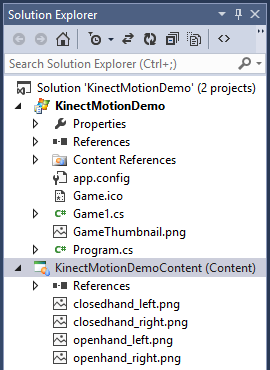
Add the images to the KinectMotionDemoContent project in the Solution Explorer by right-clicking on the KinectMotionDemoContent project and selecting Add → Existing Item.... An open dialog box will appear. Select the four PNG images you want to use and press OK. You should now see all four images in your KinectMotionDemoContent project as pictured below.

Now load the PNG images in the LoadContent method.
protected override void LoadContent()
{
 // Create a new SpriteBatch, which can be used to draw textures.
 spriteBatch = new SpriteBatch(GraphicsDevice);

 leftHandOpenSprite = 
    Content.Load<Texture2D>("openhand_left");
 leftHandClosedSprite = 
    Content.Load<Texture2D>("closedhand_left");
 rightHandOpenSprite = 
    Content.Load<Texture2D>("openhand_right");
 rightHandClosedSprite = 
    Content.Load<Texture2D>("closedhand_right");
}

The hands will be displayed in the Draw method.
protected override void Draw(GameTime gameTime)
{
 GraphicsDevice.Clear(Color.CornflowerBlue);

 spriteBatch.Begin();            
 
 // Draw all left hands
 foreach (Hand hand in leftHands)
 {
  if (hand != null)
  {
   if (hand.HandState == HandState.Closed)
    spriteBatch.Draw(leftHandClosedSprite, 
     hand.ScreenPosition, Color.White);
   else
    spriteBatch.Draw(leftHandOpenSprite, 
     hand.ScreenPosition, Color.White);                   
  }
 }

 // Draw all right hands
 foreach (Hand hand in rightHands)
 {
  if (hand != null)
  {
   if (hand.HandState == HandState.Closed)
    spriteBatch.Draw(rightHandClosedSprite, 
     hand.ScreenPosition, Color.White);
   else
    spriteBatch.Draw(rightHandOpenSprite, 
     hand.ScreenPosition, Color.White);
  }
 }

 spriteBatch.End();

 base.Draw(gameTime);
}


Press Ctrl-F5 to build and run the program. Stand in front of your Kinect, and you should see the PNG images move as you move your hands. Try opening and closing your hands to see the open/close images being displayed. If you have a friend nearby, ask them to join you so you can see four hands moving about the screen.


Problems?

When I first tried to build and run my program, I got the following error message:

The primary reference "Microsoft.Kinect, Version=2.0.0.0, Culture=neutral, PublicKeyToken=31bf3856ad364e35, processorArchitecture=MSIL" could not be resolved because it was built against the ".NETFramework,Version=v4.5" framework. This is a higher version than the currently targeted framework ".NETFramework,Version=b4.0".
To fix this problem, I closed the project in Visual Studio and opened the project's .csproj file in a text editor and changed the following line:
<TargetFrameworkVersion>v4.0</TargetFrameworkVersion>
to
<TargetFrameworkVersion>v4.5</TargetFrameworkVersion>
Then I re-opened the project in Visual Studio and re-built the application with no problems.

Thursday, December 11, 2014

Hour of Code at Kensett Elementary

Eight students from our Computer Science department met with about 50 fifth graders at Kensett Elementary on Friday, Dec 5, to participate in the Hour of Code. As you can see from the pictures, the kids were having a blast! Most of them ran through the Angry Birds tutorial, and a few tried the Frozen and Flappy Bird tutorials. When the hour was over, many of them got really excited when I told them they could keep working on the tutorials when they got home... just open a web browser and go to code.org!


Wednesday, November 26, 2014

Kinect for Windows 2 and XNA demo

Over the Thanksgiving break I managed to get my new Kinect for Windows 2 working with XNA. I couldn't find any code samples online using XNA with the new Kinect SDK, so hopefully this will help out others who are trying to do something similar.

This demo will show how to display the Kinect's video feed which is provided by its 1080p color camera. This is similar to the Color Basics-WPF C# Sample provided in the Kinect SDK 2 except that it is tailored for XNA.


Prerequisites

You must have the Kinect for Windows 2 correctly installed along with the SDK. There are plenty of online tutorials showing you how to program with the older Kinect; this is for the latest version.

Microsoft is no longer maintaining XNA, but but you can still use it in Visual Studio 2013. There are two different ways to get XNA working with VS2013:

Quick Way

Install XNA 4.0 Refresh for VS 2013. The zip file contains four components that you will need to install in succession.

Long Way

If you have VS 2010 laying around, this method will also work although it takes much longer. I found this method necessary when installing XNA in a lab setting. Using the Quick Way would not work for users who were not administrators.

  1. Install Visual Studio 2010. Any edition will work.
  2. Install Games for Windows Marketplace Client
  3. Install XNA Game Studio 4.0
  4. Install XNA 4.0 Refresh for VS 2013. After you have downloaded the zip file, extract it and run XNA Game Studio 4.0.vsix

If you want to skip both these options, you might try MonoGame. Just be aware that it does not have a content pipeline converter (software that converts content like sound files into xnb files). I have not tried MonoGame with Kinect, but I don't see any reason why it wouldn't work.


Create an XNA Project

First create an XNA project by selecting FileProject... from the menu. Then select XNA Game Studio 4.0 template under Visual C# and select Windows Game (2.0). Name the project KinectVideoXna.


Add Kinect Reference

Right-click the project in the Solution Explorer and from the context menu select AddReference.... Type kinect in the dialog box's search box, and check the Microsoft.Kinect reference. Then press OK. You should now see Microsoft.Kinect among the project's References in the Solution Explorer.


Adding Code

Add the Kinect namespace:

using Microsoft.Kinect;

Add some class-level variables:

// Texture to draw
Texture2D videoTexture;

// Active Kinect sensor
private KinectSensor kinectSensor;

// Reader for color frames
private ColorFrameReader colorFrameReader;
        
// Intermediate storage for receiving frame data from the sensor
private byte[] colorPixels;

Initialize the sensor and the data structures used for capturing data from the sensors:

protected override void Initialize()
{
 kinectSensor = KinectSensor.GetDefault();

 // Open the reader for the color frames
 colorFrameReader = 
  kinectSensor.ColorFrameSource.OpenReader();

 // Specify a handler for frame arrival
 colorFrameReader.FrameArrived += Reader_ColorFrameArrived;

 // Create the ColorFrameDescription using rgba format
 FrameDescription desc = kinectSensor.ColorFrameSource.
  CreateFrameDescription(ColorImageFormat.Rgba);
 
 // Allocate space to put the pixels to be rendered
 colorPixels = new byte[desc.Width * desc.Height * 
  desc.BytesPerPixel];

 // Open the sensor
 kinectSensor.Open();

 // Create texture large enough to hold the color frame
 videoTexture = new Texture2D(graphics.GraphicsDevice, 
  desc.Width, desc.Height);

 base.Initialize();
}

Also override the OnExiting method to free up the ColorFrameReder and Kinect sensor when the game exists:

protected override void OnExiting(object sender, EventArgs args)
{
 if (colorFrameReader != null)
 {
  colorFrameReader.Dispose();
  colorFrameReader = null;
 }

 if (kinectSensor != null)
 {
  kinectSensor.Close();
  kinectSensor = null;
 }

 base.OnExiting(sender, args);
}

Create the handler for the color photo sensor where we'll store the captured photo into videoTexture:

private void Reader_ColorFrameArrived(object sender, ColorFrameArrivedEventArgs e)
{          
 // ColorFrame is IDisposable
 using (ColorFrame colorFrame = e.FrameReference.AcquireFrame())
 {
  if (colorFrame != null)
  {
   // Copy color frame into the array
   colorFrame.CopyConvertedFrameDataToArray(
    colorPixels, 
    ColorImageFormat.Rgba);                   

   // Avoid exception when SetData method is used
   GraphicsDevice.Textures[0] = null;

   // Put pixel data into a texture
   videoTexture.SetData(colorPixels);
  }
 }
}

Finally, draw the videoTexture containing the color photo to the screen:

protected override void Draw(GameTime gameTime)
{
 GraphicsDevice.Clear(Color.CornflowerBlue);

 if (videoTexture != null)
 {
  // Draw color video
  spriteBatch.Begin();
  spriteBatch.Draw(videoTexture, new Rectangle(0, 0, 
   graphics.GraphicsDevice.Viewport.Width,
   graphics.GraphicsDevice.Viewport.Height), 
   Color.White);
  spriteBatch.End();
 }

 base.Draw(gameTime);
}

Press Ctrl-F5 to build and run the program. You should see color video of whatever your Kinect is pointed at.


Problems?

When I first tried to build and run my program, I got the following error message:

The primary reference "Microsoft.Kinect, Version=2.0.0.0, Culture=neutral, PublicKeyToken=31bf3856ad364e35, processorArchitecture=MSIL" could not be resolved because it was built against the ".NETFramework,Version=v4.5" framework. This is a higher version than the currently targeted framework ".NETFramework,Version=b4.0".
To fix this problem, I closed the project in Visual Studio and opened the project's .csproj file in a text editor and changed the following line:
<TargetFrameworkVersion>v4.0</TargetFrameworkVersion>
to
<TargetFrameworkVersion>v4.5</TargetFrameworkVersion>
Then I re-opened the project in Visual Studio and re-built the application with no problems.

Friday, October 10, 2014

Teaching an upper-level Web Development course

We're half way through the fall semester, and the spring semester will be here before we know it. Every spring I teach an upper-level Web Development 2 elective which builds on the Web Dev 1 course that I teach every semester. The Web Dev 1 course covers the fundamentals: HTTP, HTML, CSS, JavaScript, Ajax, and PHP.

The goal of Web Dev 2 is to give students more breadth and depth in web development, focusing on both client and server-side technologies. I try to choose technologies that are widely used so my students will be more marketable after graduation, and in the past I've taught a variety of technologies: advanced JavaScript, jQuery, Java servlets and JSPs, ASP.NET Web Forms, ASP.NET MVC, and creating web services with ASP.NET and JAX-RS. Of course you can't cover everything in 16 weeks, so I have to put a lot of thought into what can be adequately covered in a limited amount of time.

This summer I did some development work at Flatirons Solutions using AngularJS and web services with Spring. It got me wondering if my Web Dev 2 course should focus more on JavaScript frameworks. One of my developer friends this summer tried to convince me that JavaScript was also taking over the server and that I should be teaching Node.js instead of Java.

It can be a struggle for computing professors to ensure our courses remain relevant when technologies are always changing. Fortunately I've got a lot of Facebook friends who are developers and Harding CS alumni, so I decided to ask their opinion:

If you were in college and could take an advanced Web Development course, what topics would you like it to cover?
This elicited quite a few responses which I'll summarize here:

  1. JavaScript frameworks like AngularJS, Ember, Knockout
  2. ASP.NET MVC and Web API
  3. Node.js
  4. Python and Django
  5. Ruby on Rails
  6. LESS
  7. Web services
  8. Web security
  9. Single Page Applications (SPAs)
  10. Automated web testing, A/B testing, UI testing
  11. Understanding HTTP
  12. Picking the right data store (relational, NoSQL, Map/Reduce, etc.)
  13. Caching and latency issues
  14. Teams that implement the same project on different platforms
  15. Git
  16. Web architecture - focusing less on development and more on architecture

There may have been a few things I left off, but these received the most mentions. (Thank you for your input, guys!) I'm still making up my mind, but this is what I'm leaning toward teaching this spring:

  1. JavaScript - The more JavaScript you are exposed to, the better. I'd like my students to be familiar with a number of advanced JavaScript features and some popular libraries like Underscore.js.
  2. jQuery- Everyone needs to know the most popular JavaScript library in use.
  3. Node.js and Express - Although I have little experience with Node, I think it would be helpful for my students to apply their JavaScript skills on the server as well as the client. I will probably tie in MongoDB which will give them experience with a NoSQL database. We will likely create a web service and consume it with an app written with...
  4. AngularJS - Very popular JavaScript framework with strong job demand. Plus I got some experience with it this summer. We will write unit tests using Jasmine and use Karma for integration testing.

My students will work in pairs on their projects and use GitHub to house their code like they do in my GUI course. We'll use the WebStorm IDE which I came to love this summer. I'll inject other topics like security where they are applicable.

A weakness of this plan is that my students will not get to use Java or ASP.NET which are very popular server-side technologies. However, they will leave this class fluent in JavaScript.

Friday, August 01, 2014

Last day at Flatirons

Today is my last day at Flatirons Solutions. I've really enjoyed these eleven weeks and learned a ton. My web development courses, in particular, will definitely benefit from the exposure I received to some new technologies that I'll be integrating into those courses. I'm very thankful to George and Paula for giving me the opportunity to spend my summer here, and I hope that I made some major contributions.

Tuesday, June 24, 2014

Half way through our Colorado summer

We're now entering our sixth week living in Boulder. My family is getting more accustomed to apartment living. It's ironic though how we thought we were escaping the Arkansas heat only to live in an apartment lacking air conditioning! At least the temperature drops each night.

We had a little scare a few weeks ago. Becky had developed a large lump on her thyroid, and after meeting with a surgeon, she was strongly encouraged to have it removed in case it was cancerous. My sister (who is now eligible for sainthood) flew out here from Chicago so she could watch the kids while Becky recovered from surgery. The surgery went well, and praise God the lump was not cancerous! Becky is still healing from the surgery, but she is doing really well. The kids were pretty oblivious to the whole thing since Aunt Sass kept them busy with swimming and museums and making pizza. Have I mentioned how awesome my sister is?

Since the surgery, Becky and the kids have been occupying themselves with all kinds of activities like tennis lessons, swimming lessons, and now karate classes while I toil away at Flatirons each day. wink When I arrive home in the evenings we often eat and go out to a park or discover some new part of Boulder. On the weekends we have visited Red Rocks, Estes Park, and a few other places. In the photo below we hiked around Bear Lake at the Rocky Mountain National Park. As you can tell from our Chacos, we were not expecting to see snow!

We've gotten to see a number of old Colorado friends which has made our time out here very meaningful. Some of our best friends from Searcy also stopped by to visit for a couple of days, and we were able to dine at Casa Bonita and see a Rockies game with them.

Next week my brother and his wife will be visiting from Texas, and some more good friends from Searcy will be coming up July 4th weekend. Becky has some college friends coming up to visit the last week of July. Lots to look forward to!

I'll conclude with a note of thankfulness for the Boulder Valley Church of Christ. They have really taken us in, and we are so thankful for the many ways they supported us during Becky's surgery. One of the ladies watched the kids for us before Aunt Sara arrived, and one of the elders came to the hospital to pray with us immediately before the surgery. These are people who truly love the Lord.

I'm also thankful for the incredible VBS they put on. You would not believe how much effort they expended to entertain and teach about 50 children about God's love for a full week. Ethan and Braden absolutely loved going to VBS each day. I think it's really great that the body of Christ can be found nearly everywhere you go.

Sunday, June 01, 2014

Week 2: Finally making some contributions

Last week at Flatirons was admittedly difficult. I really like to learn new stuff, but if I'm not contributing much and all I'm doing is trying to take in lots of information, time can pass by very slowly.

This week I finally was able to write some code and fix some lingering bugs in our web application. We are using AngularJS which is new to me, and our code base is quite large, so I was a little on the slow side. By the end of the week I felt like I finally had a good idea how the application was designed and where to go to modify the app's functionality. My speed should start improving.

It really felt good to write code again. I really enjoy teaching, but I seldom have time to contribute to software that others are using. It's amazing to me how quickly time goes when I am programming and getting things to work right. Each bug fix makes me say "YES!" inside (and sometimes outside!).

Saturday, May 24, 2014

A Tale of Two Cities: Searcy and Boulder

I've just finished the first week of my summer position as a software developer at Flatirons Solutions in Boulder, Colorado. My family and I drove up from Arkansas on Sunday, and I started Monday morning. Everyone at Flatirons has been very friendly and helpful, but it's been a sharp learning curve getting up-to-speed. I spent the entire week getting familiar with the system I'll be working on, reading system documentation, learning about 10 new technologies or tools, and figuring out how things are done at Flatirons. I have yet to contribute anything, but hopefully next week that will change.

Our living situation has also been a bit of an adjustment. Moving from a house to a small two bedroom apartment has had its challenges. We got spoiled living in Arkansas in our own home where our kids could be loud and play in our back yard. Now we have to be quiet or anger the neighbors below, and there's no yard to speak of. We also have a very busy street just 30 feet away from our front door, so we've had to get used to much more noise and foot traffic.

What has been most notable is the change in culture from Searcy to Boulder. Both cities have that college town feel, but that is about where the similarities end. Searcy is small (population 20K), conservative, largely Christian, and enjoys a low cost of living. Boulder is large (100K), very liberal (some call it "the San Francisco of Colorado"), religiously diverse, and ridiculously expensive (49% higher than Searcy). Searcy is hot and humid, Boulder is a mile above the ocean and very dry.

Boulderites are a very healthy bunch whereas Searcians like their fried Southern cuisine (Colorado has the lowest state obesity rate, and Arkansas has the 7th highest). In Searcy you are lucky to see one person a day riding their bike; you will easily run over a biker in Boulder if you blink. I've never seen so many people walking, running, or biking.

Boulder is also well-known for their environmentalism. You will get a "look" at the grocery store if you show up without your own bags, and many vehicles are gas-sippers. The Searcy grocer will double-bag practically everything, and SUVs and enormous trucks dominate the roads in Searcy.

What I really enjoy about Boulder is the beauty. It lies just east of the Flatirons, a beautiful range of mountains that can be seen from our apartment. We went hiking this morning beginning at Chautauqua Park and soaked-up the beauty that God has created. Searcy has its beautiful places as well, but it's not quite in the same league.

One week down, nine more to go!

Wednesday, May 14, 2014

Off to Boulder

This summer I'll be working at Flatirons Solutions in Boulder, Colorado. I'm very excited by this opportunity to take a break from doing research and spend some time developing software and learning new tools and techniques that I can incorporate back into the classroom. I grew up in Denver, so I'll have the opportunity to see lots of old friends; my kids will get to see where their dad grew up.

I hope to blog some about my experiences in Boulder, so stay tuned.

Sunday, May 11, 2014

An Andrid app that logs into Pipeline

As I stated in an earlier post, I taught an Android course this semester, and one team created an app called HU Pal that gives students access to their class schedule and chapel attendance information. This info is normally locked in an online system called Pipeline which requires users to login with a username and password. Once you have given HU Pal your username and password, it logs into Pipeline automatically and scrapes the information from a couple of web pages.

Brent Ward, one of the developers of the HU Pal app, wrote a document detailing how they created their app to login to Pipeline and screen-scrape personal information from web pages using jsoup. You can download the document here. Although the information in the document is specific to Pipeline, the techniques they describe can be generalized to any online system that requires user authentication.

Friday, May 02, 2014

Android Showcase 2014

This semester I taught an Android App Development course for upper-level computer science students. This is the second time I've taught this class. Nineteen students were placed into six teams. Each team came up with their own idea for an Android app and created a final beta that was evaluated by their peers:

CrashPad: Rent an apartment or check your apartments that are being rented.
EatSmart: Track your dietary intake in the Harding Cafeteria.
HevaHavoc: Unique paddle game that uses the accelerometer to control the paddles.
HU Pal: See your class schedule, check your chapel attendance, and show a campus map.
Puzzle 15: Customize the background of a 15 puzzle game with any photo.
Pentago: Play the game of Pentago against the computer or another human.

None of these apps are currently available to the public, but a few students said they were going to work on them some more and eventually make them available on the Android Play store.

Last night we had an Android Showcase in the Rhodes Field House along with the CS and Engineering Capstone courses. Thane, David, and Brent (pictured below) were given the award for the app receiving the best peer evaluations (HU Pal).

Overall I am quite pleased with how the projects turned out. I think most of my students would say they learned a lot about developing a successful app, even if their app fell short of what they hoped it would be. Most of the teams worked well together although there was a little friction which is to be expected. This is the only class where I force my students to work in teams, but I think the experience will prove valuable to them as they are forced to work in teams in their future professions.

Monday, March 10, 2014

Back from SIGCSE 2014

I attended SIGCSE 2014 in Atlanta last week. It's the fifth Symposium in the past six years I've been able to attend. There were over 1200 attendees (mainly computer science educators) at the Symposium this year.

Getting females engaged in computing remained a huge focus as usual. Interestingly enough, I would gauge that close to 50% of the conference participants were females (education is generally not short on females). There was also a big emphasis on getting computing into K-12. Hadi Partovi of code.org (you know, the Hour of Code guys) gave a keynote one morning on this topic which really pumped up the audience.

Big Data and Data Science seemed to be two important and related topics that received quite a lot of attention. Scanning the conference program, there were two papers on Data Science, and two posters and two papers about Big Data. I'm surprised no one offered a workshop on either topic.

One topic that seemed less important was mobile programming. There was one paper on using Android projects in CS1, and a workshop on App Inventor, but this topic is not nearly as hot as it was a few years ago when I offered an Android workshop to a packed room of CS educators in Dallas. I think it's because mobile programming is so ubiquitous today.

On Friday evening I manned a poster entitled Resources for Teaching Web Science to Computer Science Undergraduates by Michael Nelson and myself. (You can find the resources here.) I was somewhat surprised that only two of the twenty or so individuals I spoke to that evening knew anything about web science. One individual had been teaching a similar course but didn't know it could be called "web science". It was nice to see a lot of interest in the topic.

The next morning was my favorite session: Nifty Assignments. But this time I was one of the presenters! I introduced Schelling's Model of Segregation using some history of the Little Rock Nine as back-drop. The other presentations were pretty fantastic.

One thing I love about SIGCSE is being immersed into new ideas that I will use to make my teaching better. The thing I don't like is the feeling that I'm not teaching as well as some of my peers! Equally good motivation to keep on improving.

Friday, January 17, 2014

Tom Brady can be funny too!

This is a huge weekend in the NFL. The AFC Championship features the Denver Broncos (my favorite team) and the New England Patriots, headed by Peyton Manning and Tom Brady, respectively.

Manning is an incredible QB. But he's also very talented when it comes to comedy. I would argue he is one of the best comedic commercial actors in the NFL. Almost everyone has seen his MasterCard commercials. He's also made satirical movie commercials, appeared on SNL, and has some skits with his brother Eli that have gone viral like Football on Your Phone and Football Cops. It's hard not to like a guy that is so talented and hilarious at the same time.

Brady is of course also an incredible QB with three Super Bowl wins to back it up. But where Manning gets all the love, Brady is the most disliked QB in the NFL. I've never been a Brady fan either; I've always thought he was full of himself.

These past few months, however, I've come to like Brady just a little bit more. OK, he was my fantasy team QB which helps some. But Brady also stared in a couple of hilarious commercials for Under Armour over the past couple of years that I just saw recently. The first is Tom Brady's Wicked Accent which features an angry Brady smacking a stand-up cutout of himself. The follow-up is Tom Brady's Best Friend where he apologizes for his behavior in the first commercial and then loses his temper once again. He's also pretty hilarious when searching for someone to high-five.

Manning is still on top when it comes to comedy. But Brady should have at least a little of our comedic respect.

DISCLAIMER: If the Broncos lose this weekend, I may delete this blog post out of disgust for Brady.

Tuesday, January 14, 2014

A new semester begins

The Spring 2014 semester has begun. The cold and lifeless campus is now full of energy and life. I'm teaching four courses: Programming 2, Internet Development 1, Internet Development 2, and Android Application Development. Most every course in our department is over capacity which reminds of me of how it was in the late 1990s. Hopefully we won't end up crashing like we did in the early 2000s.

As we begin a new year, there is unfortunately some sadness. Just a few days ago, one of our undergraduates was killed in an auto accident while heading back to school. Kailey Massey was just 20, and she apparently ran into the back of an 18-wheeler on I-30. There will be a memorial service for her on Wednesday in chapel.

This comes on the heals of another student's death. Harding grad student Lauren Bump, age 24, was murdered in a San Antonio park near her home over the winter break. There was a memorial service for her on Sunday.

President McLarty did a great job addressing these two tragic events in chapel yesterday morning. Both of these girls had a genuine love for God and let it show in their lives (see Lauren's last blog post entitled Success). They will truly be missed.

Friday, December 27, 2013

End of 2013

My family and I wish you a merry Christmas
and a happy New Year!


But the angel said to them, "Do not be afraid. I bring you good news of great joy that will be for all the people." - Luke 2:10

I consider myself to be a very blessed man to have a wife who loves me, two growing boys who give me much joy, friends and family who encourage me, and a career teaching computer science to eager college students. Whether these blessings continue this coming year or not, my hope is that God will be glorified in 2014 even more so than this year. Goodbye, 2013.

Friday, September 27, 2013

President McLarty's First 120 Days

Harding's fifth president, Dr. Bruce McLarty, took the reins from Dr. David Burks on June 1, 2013. He's been in office now for almost four months, and so far I believe he's done a fantastic job. Because Harding so rarely changes presidents, I thought it would be helpful to briefly summarize some of the more notable events in the transition from Burks to McLarty.

The picture below shows Dr. Burks handing over the office key to Dr. McLarty on the last day of Burks' presidency. I grabbed this pic from Dr. McLarty's Twitter feed. Yes, our new president is an avid tweeter.

For those of you reading this blog who don't know much about Dr. McLarty, he is a Harding graduate who was once a missionary in Africa and a preacher at the College Church of Christ which is located near Harding University. Eight years ago Dr. McLarty moved into academia, filling the role of vice president for spiritual life and later dean of the College of Bible and Ministry. He was named Dr. Burks' successor in November of last year. Dr. McLarty discusses the process of becoming president, his legacy and more in this online interview.

One of Dr. McLarty's first acts was to make some modest changes to the presidential cabinet. Dr. Jim Carr moved from executive VP to senior VP, and Dr. David Collins moved up to executive VP. Dr. Dan Williams was hired to fill Dr. McLarty's position as vice president for church relations, Floyd Daniel was retiring soon, and the other cabinet members were to continue with their current roles. Overall, it was a seamless continuation from the previous administration.

Summer graduation was probably Dr. McLarty's first large-scale ceremony to preside over, and he did something that many of the faculty had been secretly longing for for years: He nixed the singing of "Climb Every Mountain". Yes, the song that has traditionally been sung at the conclusion of every graduation ceremony since I can remember was finally put in its resting place.

On the first day of chapel, Dr. McLarty established a good rapport with the students by asking them what they did during the summer and using some well-placed humor, like asking Dr. Burks to spell camaraderie.

Dr. McLarty focused the first week of chapel on why Harding was unlike most universities, requiring the entire student body to attend daily chapel: "Chapel is about worship, community building, and confession." I noticed that many of the students "got it" and have put away their phones and books this semester to focus on God during chapel.

The first day of chapel Dr. McLarty also made the student body swear that if any of them ever thought they wanted to leave Harding, they'd first stop by his office and talk with him about it. Something tells me our retention levels are going to start increasing if the students will actually take him up on his offer.

We're six weeks into the fall semester, and so far it is business as usual. I imagine Dr. McLarty is still getting up-to-speed on being president, but so far the transition has been quite seamless.

I'll close with the Presidential Inauguration ceremony which occurred last Friday, Sept 20. Afternoon classes were cancelled so everyone could attend the ceremony on what was, unfortunately, a very rainy day. There were hundreds of guests on campus for the event. Some of them were representatives from other universities, like John deSteiguer, President of Oklahoma Christian University, who I chatted with briefly. The faculty were all part of the ceremony, and some served as delegates from their alma maters (I represented Old Dominion University).

You can watch the 2.5 hour ceremony online. My favorite part is the singing of The Battle Hymn of the Republic by the Harding chorus, choir, and orchestra. Look for it at minute 42 and stick around until the finale which was quite powerful.

I took the photo below which shows the former presidents Dr. Burks and Dr. Ganus placing the presidential medallion over Dr. McLary's head.

After the ceremony, the entire crowd moved to the Harding cafeteria for hors devours. It was a time of celebration as we welcomed our new president.

Monday, July 29, 2013

JCDL 2013 wrap-up

Last week I attended JCDL 2013 in Indianapolis along with Harding students Keith Enlow, Monica Yarbrough, and Daniel Sebastian. It's been four years since the last time I attended the conference, and it was great to see a lot of old friends. Below are friends from my days at Old Dominion University: Johan Bollen (now at Indiana Univ), Michael Nelson (still at ODU), and Martin Klein (now at LANL).

For a very thorough summary of the conference, see Justin Brunelle's blog post. There's some nice pictures here of the hotel and other events. Below I am going to highlight the work that my students and I presented. By the way, the Harding students who attended with me were the youngest attendees at the conference. This was a great experience for them, getting to interact with graduate students and researchers at their first academic conference.

The first day of the conference I presented a short paper that I co-authored with Richard Schneider entitled First Steps in Archiving the Mobile Web: Automated Discovery of Mobile Websites. This was work that Richard did as an undergraduate student in the summer of 2012 in which we try to automatically detect the URL for mobile sites so they can be archived.

The next evening Daniel Sebastian shared his poster Semi-Automated Rediscovery of Lost YouTube Music Videos. Daniel built a Firefox add-on called Volitrax last summer which helps Firefox automatically relocate music videos in YouTube when they are removed.


I manned Heather Tweedy's poster: A Memento Web Browser for iOS. Heather completed the iOS Memento Browser last summer, and I recently completed a new version for Android. The browser allows you to see web pages as they used to look using Memento underneath the hood.


After the conference concluded, we attended the Web Archiving and Digital Libraries Workshop (WADL 2013) which was organized by Ed Fox. There were about 20 of us in attendance, and with this smaller group we were able to have a lot of discussion about the work each of us was doing with web archives.

I gave an introduction into the problem of archiving the mobile web, and Monica followed with her work this summer on building a web service that others could use to find mobile websites. Keith concluded our joint talk with his work on getting Heritrix to archive some mobile sites. Our slides are below.


I really had a great time in Indianapolis. One unique thing I did there was to visit the Star Wars exhibit at the Indiana State Museum. They had all original costumes and models from the movies. It was a really cool exhibit for a Star Wars fan. I just wish my boys could have been there to see it!

Thursday, July 11, 2013

Harding campus transformation

Harding is undergoing an extensive physical transformation this summer. When the students return in the fall, things will look quite different. I took a few pictures around campus this morning which I've posted below.

On the east side of campus, the home which housed the former President has just been renovated for Bruce and Ann McLarty, Harding's new President and First Lady.


Moving further west we have the new softball field which is being prepared for Harding's new collegiate women's softball team. The stadium is the first thing you'll see when you drive into Harding's south entrance.


Just a hundred yards further west the new Health Sciences Building is nearing completion. They just started work on the parking lot a few days ago.


Further down the street you can see construction continues on Legacy Park. This is one of my favorite parts of campus because the architecture is beautiful, and it has a vibrant feel to it. The second picture shows the West Married Apartments which are days from being knocked down to make room for the second phase of construction.


Finally, some new construction next to Pizza Hut (south-west corner of campus). You'll never believe what is being built. Could it be a cool new place to hang out? A trendy new restaurant or coffee shop? No, it's another bank. Because 5000 banks within a two mile radius just isn't enough.


Looking forward to seeing all our students again next month!

Monday, July 08, 2013

Android update for Memento Browser

I'm pleased to announce the updated version of the Memento Browser for Android is now available. It's taken me a few months to update the UI, add some functionality, and fix some bugs that lingered in the old version. There are still some things I'd like to improve, but I wanted to get it out there before JCDL 2013 in two weeks where I'll be showing off the iOS and Android versions of the browser.

Please give the app a test-drive on your Android phone or tablet, and let me know what you think.


Update on 7/16/2013

You can now get the Memento Browser from the Google Play Store!

Thursday, May 16, 2013

Hand-writing code on exams

Yesterday I posted a question to the SIGCSE mailing list which garnered a lot of responses. I was interested in how my colleagues felt about requiring students to hand-write code on exams. It's a practice I've followed in most of my courses since I started teaching in 1997, and it's something all of my colleagues at Harding still do. Even the Computer Science AP exam requires students to hand-code their solutions.

The reason I asked this question was because this semester I started receiving more push-back than normal from students who complained about having to hand-write code on their exams. One beginner complained that he couldn't write well or quickly. Another said it was too different going from an IDE to paper. One didn't understand why I would ask him to write code that the compiler auto-generates (a getter and setter in a Java class), and another complained this would be the only time in his life that he would be forced to hand-write code, so what was the point?

So I put this to my colleagues: Is requiring our students to hand-write code on exams an out-dated way of assessing our students?

The question received more than 50 responses in the past 24 hours, most of them in favor of hand-writing code on exams. There were a few, however, who abandoned this practice a while ago in favor of exams which were at least partially completed with an IDE in a computer lab.

Below is a summary of the responses. I begin with various reasons why my colleagues have their students hand-write code on exams (the pros) followed by some reasons not to (the cons). At the end I summarize some of the best practices for those who require hand-written solutions and those using an IDE on an in-lab exams.

Pros of Hand-Writing Code

  1. Some instructors simply don't have easy access to a lab, so having their students hand-write code is the most feasible solution. And computers are not always reliable; they might have software problems, crash, etc.
  2. Many students experience much more stress writing code in an IDE under time pressures than hand-writing code because they can get hung-up on syntax errors. It's easier to give partial credit and forgive minor syntax errors like missing a semicolon when students hand-write their code. It's also difficult to control cheating when using an IDE since the computers are networked.
  3. Hand-writing code demonstrates the student's level of mastery without the aid of a crutch. Using an IDE can encourage students to "fish" for the answer... they may try many different things to see which one works without really understanding the problem or solution.
  4. When interviewing for a job, students will often be asked to hand-write code to solve various problems. And many programmers in industry collaborate by writing code on whiteboards without the help of an IDE. Of course the interviewers are usually more focused on the thought process and less concerned about syntax correctness. And coding on a whiteboard is also more about communicating ideas, not the syntax.
  5. Students should not rely too heavily on an IDE because every IDE is different and they are not always available.
  6. Some faculty feel there are some things that every programmer should be able to do, including hand-writing solutions to fundamental CS problems like "how many nodes are in a binary tree?". Surely some computing pioneers like Dijkstra would agree. wink

Cons of Hand-Writing Code

  1. Most real coding is done in an IDE, and writing code on paper is too tedious and foreign.
  2. Some instructors admit to needing the help of an IDE when they program because there are so many functions and differences between languages that it's difficult to remember everything. Why should we expect students to do with less?
  3. Many students can type much faster than they can write, so they are penalized for writing slow. College students hand-write much less today in general, and many feel more comfortable in front of a keyboard.
  4. Grading hand-written code is slow and painful. It's much easier to automate the grading of problem sets in an IDE where problems are either solved or not solved.

Best Practices for Hand-Written Exams

There are some things instructors can do to prepare their students to perform optimally when hand-writing code on an exam.

  1. Make sure students get plenty of practice hand-writing code before the exam so it is less foreign. Pre-tests are ideal.
  2. Make sure students don't have to write really long segments of code, certainly nothing over a page in length.
  3. Make sure hand-written coding exercises focus on the basics, not on memorizing lots of different functions and minutia. If students do need to use a library, include the interface documentation for the library on a supplemental handout.
  4. Beginners should be tested for precise syntax, but upper-level students should be given more leeway. Allow students to write in pseudocode if you are more concerned with the thought process rather than the syntax. (If syntax is more important, award pseudo-points for pseudocode. wink - Richard Pattis)
  5. Let students know that if they can't remember how to do something they can write a comment like "and here I resize the vector, I forget how."
  6. Instructors should hand-write code on the white board in front of students so they can see how it is done.
  7. To quell potential complaints, tell students in advance that they will often be expected to hand-write code in job interviews and on the job when computers are not nearby. Also tell them you will be much more forgiving when grading their code than the compiler will be.

Best Practices for In-Lab Exams

Several of my colleagues reported bad experiences with in-lab exams, but others suggested ways to do it successfully.

  1. Don't expect students to be able to solve the same number of problems in an in-lab exam as they would on paper. Reduce the number of problems significantly because they will get hung-up on some syntax errors.
  2. Use problems that are easily broken into small discreet steps that are as independent as possible so getting tripped-up on one problem doesn't stop the student from completing other problems. (Note: This is very hard to do.)
  3. Make sure students get practice writing code under time constraints, possibly with pre-tests, so they know they must study and use their time wisely. This will make the exam less stressful.
  4. You may allow students some Internet access to sites like StackOverflow to remind them of proper syntax or to get ideas on how to formulate a solution. Obviously you will have to trust that students are not collaborating, and you will need to ask problems for which no solution can be found online.


Thank you to the many SIGCSE members whose ideas contributed to this blog post. If you think of something else that should be added to the lists above, please email me or leave a comment.